- Tags visibility in Pleo
- Tax Synchronisation and visibility in Pleo
- Link Business Central Dimension to Pleo Teams
- Record Vendor on card expenses
- Vendor Tagging
- Disable / Enable Purchase Invoices
- Invoice & Invoice Payment Journals
- Posting Date as Export Date
- Attachments
- Ignore Wallet Topups / External Reimbursements
Tags visibility in Pleo
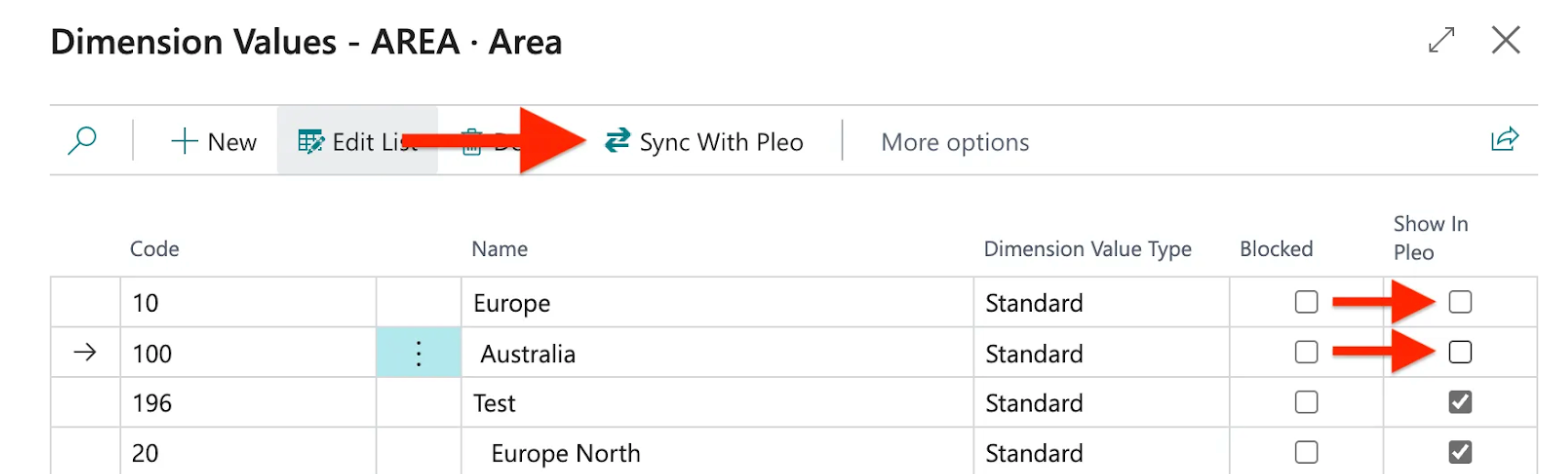
You can adjust which Dimension Values will be visible as Tags in Pleo. This allows you to limit the number of Tags making it easier to find the right Tag for an expense.
- In Business Central, open Pleo Integration Setup
- Click Tags Setup
- Click on a three-dots icon next to a synchronised Dimension
- Uncheck Show in Pleo for Dimension Values you do NOT want to have in Pleo as Tags
- Click Sync With Pleo to instantly update Tags in Pleo

Tax Synchronisation and visibility in Pleo
By default, all non-blocked Normal and Reverse Charge VAT Setups are synced with Pleo. Learn how to exclude specific VAT Setups.
Link Business Central Dimension to Pleo Teams
Learn how to link Pleo Teams to a Dimension from Business Central to automatically assign dimension values to expenses based on the team selected.
Record Vendor on card expenses
You can book Pleo card expenses and refunds on a Vendor.
- In Business Central, open Pleo Integration Setup
- Under Configurations, adjust the Record Vendor on Card Expenses:
- If disabled (default) - card expenses will be recorded as a single journal entry in the Expense journal.
- If enabled - Pleo card expenses will be booked on a Vendor in Business Central. Use this feature in pair with Vendor Tagging.
Vendor Tagging
Learn how to activate Vendor tagging in Pleo. You can use this feature in combination with Record Vendor on card expenses.
Disable / Enable Purchase Invoices
If you prefer to have all your Pleo expenses recorded as journal entries, you can disable Purchase Invoices for the integration:
- In Business Central, open Pleo Integration Setup
- Access the Advanced section
- Set Purchase Invoices switch:
- If enabled (default), invoices and all other expenses booked on a Vendor will be recorded as Purchase Invoices in Business Central
- If disabled, all expenses (inc. invoices) will be recorded in Business Central as Journal entries
Invoice and Invoice Payment Journals
If you disabled Purchase Invoices for the integration, you can set up dedicated journals to separately record invoice and payment journal entries:
- In Business Central, open Pleo Integration Setup
- Click Show more
- Set the Invoice Journal
- Used for recording invoices and card/out-of-pocket expenses booked on a vendor.
- Template: Purchase is recommended
- Set the Invoice Payment Journal
- Used for recording payment entries and reimbursements booked on a vendor.
- Template: Payments is recommended
Export Date As Posting Date
Learn how to have posting date as export date for your Pleo expenses in Business Central.
Attachments
By default, expense attachments are transferred to Business Central together with exported expenses. To disable exporting of attachments:
- In Business Central, open Pleo Integration Setup
- Access the Advanced section
- Disable the Attachments toggle
Ignore Wallet Topups / External Reimbursements
If your bank feed already imports Pleo top-ups or external reimbursements, you can deactivate exporting these from Pleo to avoid duplicates in Business Central:
- In Business Central, open Pleo Integration Setup
- Access the Advanced section
- Disable the Ignore Wallet Topups and/or Ignore External Reimbursements toggle(s)
Was this article helpful?
That’s Great!
Thank you for your feedback
Sorry! We couldn't be helpful
Thank you for your feedback
Feedback sent
We appreciate your effort and will try to fix the article
Need more help? Contact us.
Login and click the ? in the bottom right corner to chat with us. Having issues logging in? Find out why you are unable to log in.
