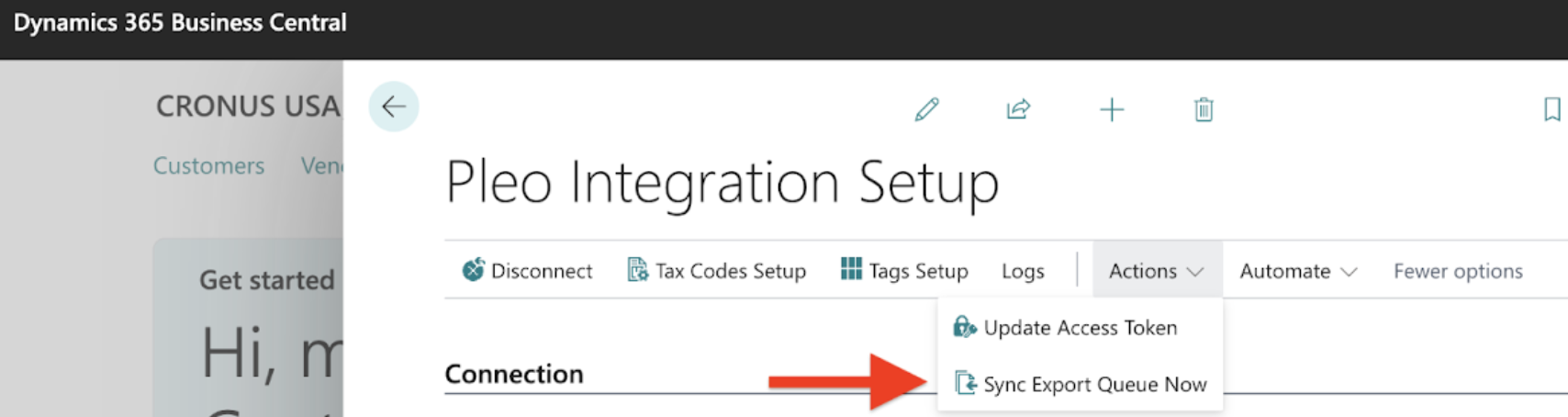
By default, the Business Central integration v2 checks with Pleo every 5 minutes to see if any expenses are ready to export. To trigger the exporting process instantly:
- In Pleo, move expenses to Export Queue
- Export the expenses
- In Business Central, open Pleo Integration Setup
- Under More options, access Actions
- Click Sync Export Queue Now, and export happens immediately
Was this article helpful?
That’s Great!
Thank you for your feedback
Sorry! We couldn't be helpful
Thank you for your feedback
Feedback sent
We appreciate your effort and will try to fix the article
Need more help? Contact us.
Login and click the ? in the bottom right corner to chat with us. Having issues logging in? Find out why you are unable to log in.
